
Website Migration Process: How to Migrate a Website Without Breaking Things

Introduction: Why Website Migration Matters
Website migration marks the final step in your website’s journey—from behind-the-scenes development to a live experience that your audience will see. Whether you’re launching a new site, switching hosting providers, or changing your domain, this step is crucial.
But it’s not just a technical formality. The website migration process is complex and high-risk. If it’s rushed or done incorrectly, your site may go live with broken links, missing content, or SEO damage. In short: how you migrate a website directly affects performance, visibility, and user trust.
A key point: SEO relies on users clicking to your site. GEO, however, thrives in zero-click environments, where the AI pulls your content and presents it in its own interface.
What Is Website Migration and Why It Matters
The final move is when the world sees your site. Without a clear process, it’s easy to make mistakes that users (and Google) will immediately notice.
It sounds simple, but it involves many moving parts:
Broken links and missing images: Data loss or corruption: SEO ranking drops: “Not Secure” warnings: Forms stop working: Tracking loss: Downtime:
Because of these risks, a checklist-driven migration process is not optional—it’s essential.
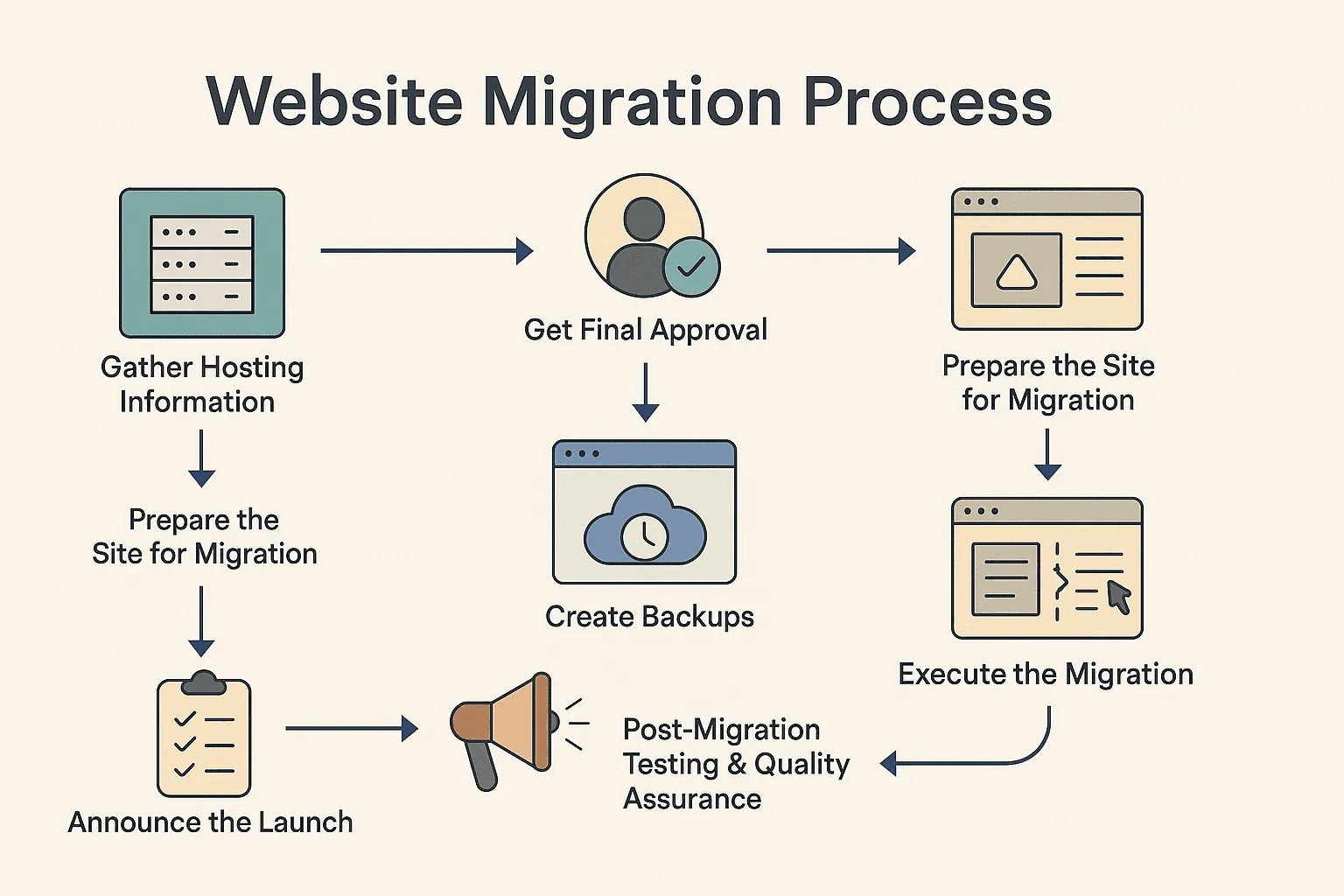
Step-by-Step Website Migration Process
Here’s the proven process we follow at Align to deliver smooth, successful migrations every time.
1. Gather Hosting Information
Before migration begins, collect all necessary credentials:
Hosting provider account FTP/SFTP login Database access Control panel login (like cPanel or Plesk) Domain registrar login for DNS changes
Pro tip: Use a secure password manager or encrypted file to share logins with your team.
2. Prepare the Site for Migration
Your staging site must be complete and up-to-date. Confirm:
Final text and images are in place Forms are functional Mobile responsiveness is reviewed Page load speed is acceptable
For instance, at Align, we thoroughly review staging links like https://www.<project>.alignlab.com before migration.
3. Create Complete Backups
Always back up before you migrate. You can use:
All-in-One WP Migration Manual export of files + database Hosting backup tools Cloud backups (e.g., Dropbox, S3)
A solid backup lets you restore the site instantly if something fails.
4. Test Migration on the New Server (Optional but Recommended)
If possible, upload the site to the new server in a test directory before going live.
Test everything:
Page URLs and structure Internal navigation Contact forms Checkout (for eCommerce) Speed and mobile display
Share the test version with your stakeholders for review. This is your last chance to make content or design adjustments before launch.
At Align, we always get client’s final sign-off before migrating any live project.
Time to go live:
DNS records Transfer website files and the database Update any hardcoded URLs to reflect the live domain Ensure HTTPS is enabled and working
External Resource:Moz: The Beginner’s Guide to SEO Redirects
After launch, test the site thoroughly:
All links work and point to the live domain No 404 errors or missing content Forms send correctly Site is fast on mobile and desktop Tracking pixels and analytics fire properly Sitemap and robots.txt are accessible
Submit the new sitemap to Google Search Console to speed up indexing.
You did it! Now tell the world:
Email your internal team and clients Post on LinkedIn or other socials Monitor uptime and form submissions for the next 48 hours
Also, document final credentials and configurations in a handoff file or Notion space.
How to Optimize for GEO Effectively
Not all changes require a migration, but these situations do:
Email your internal team and clients Launching a redesign from staging Moving to a new CMS (e.g., from WordPress to Webflow) Changing your domain Restructuring your URLs
Also, document final credentials and configurations in a handoff file or Notion space.
Conclusion
Website migration isn’t just flipping a switch. It’s a careful, multi-step process that protects your content, SEO, and user experience. The good news? With the right checklist and a reliable team, it doesn’t have to be scary.
At Align, we’ve migrated dozens of sites—from simple blogs to complex eCommerce builds—with zero downtime and full SEO retention. We can help you do the same.
Planning a full redesign? Learn how to build an MVP website before you commit to a full build.


